 Rights Rights
|
|
Purpose
Accessing the Rights
Menu
While in Focus Enterprise, select
Setup > Rights.
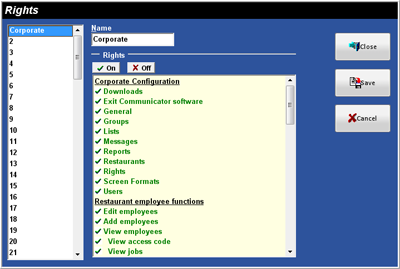
Figure 4.7 Rights
Window
▪ On: A ü plus green text indicates a Right is
turned on.
▪ Off: A X
plus red text indicates a Right is turned off.
▪ Section Header: Clicking on the section
header does not turn on or off any Rights. No specific Right is related to the
heading itself. Note: Section headers are underlined (Corporate
Configuration in the above picture).
Figure 4.7.1 Rights Window Fields
|
|
Description |
|
Name |
|
 |
Turns the selected Right On. |
 |
Turns the selected Right Off. |
Figure 4.7.2 Corporate
Configuration
|
Right |
Description |
|
Downloads |
|
|
Exit
Communicator Software |
Allows
the user to Exit Focus Communicator. |
|
General |
Allows
the user to access the General Window. |
|
Groups |
Allows
the user to access the Groups Window. |
|
Lists |
Allows the
user to access the Lists Window. |
|
Messages |
Allows
the user to access the Messages Window. |
|
Reports |
Allows
the user to access the Reports Window. |
|
Restaurants |
Allows
the user to access the Restaurants Window. |
|
Rights |
Allows the
user to access the Rights Window. |
|
Screen
Formats |
Allows
the user to access the Screen Formats Window. |
|
Users |
Allows
the user to access the Users Window. |
Figure 4.7.3
Restaurant Employee Function
|
Right |
Description |
|
Allows
a user to edit and delete employees. |
|
|
Allows
the user to add employees. Note:
If the user does not have this Right the Add button is grayed. |
|
|
Allows the user to view employees. |
|
|
Allows the user to view employee Access Codes. |
|
|
Allows the user to view employee Jobs. |
|
|
Allows the user to view employee Pay Rates. |
|
|
Allows
the user to view the Employee Status and Termination Reason. |
|
|
Allows
the user to view an employee Skills. |
Figure 4.7.4
Restaurant Setup Function
|
Right |
Description |
|
Blackboards |
|
|
Checks |
Allows the user to view Checks in the Restaurant Menu. |
|
Customers |
Allows
the user to Add, Edit and Delete Customers in the Restaurant Menu. |
|
Customer
Setup |
Allows the
user to edit customer Coupons, Plans, Phone Prefixes, Streets and Zones in
the Restaurant Menu. |
|
Deposits |
Allows
the user to enter Deposits in the Restaurant Menu. |
|
Discounts |
Allows
the user to configure Discounts in the Restaurant Menu. |
|
Enter
Inventory |
Allows
the user to enter Inventory in the Restaurant Menu. |
|
Enter
Invoices |
Allows
the user to enter Invoices in the Restaurant Menu. |
|
General |
Allows
the user to configure options in the General Window in the Restaurant
Menu. |
|
Gratuities |
Allows
the user to configure Gratuities in the Restaurant Menu. |
|
Inventory
Setup |
Allows
the user to edit Inventory Groups, Ingredients, Recipes, Subgroups, Units,
and Vendors in the Restaurant Menu. |
|
Jobs |
Allows the
user to configure Jobs in the Restaurant Menu. |
|
Labor Groups |
Allows
the user to configure Labor Groups in the Restaurant Menu. |
|
Locations |
Allows
the user to configure Locations in the Restaurant Menu. |
|
Menu |
Allows
the user access to the Canvas Designer and Menu Item configuration in the
Restaurant Menu. |
|
Order Types |
Allows
the user to configure Order Types in the Restaurant Menu. |
|
Packages |
Allows
the user to configure Packages in the Restaurant Menu. |
|
Paid Ins |
Allows the
user to configure Paid Ins in the Restaurant Menu. |
|
Paid Outs |
Allows
the user to configure Paid Outs in the Restaurant Menu. |
|
Payments |
Allows
the user to configure Payments in the Restaurant Menu. |
|
Price Levels |
Allows the
user to configure Price Levels in the Restaurant Menu. |
|
Printer
Drivers |
Allows
the user to configure Printer Drivers in the Restaurant Menu. |
|
Printer
Formats |
Allows
the user to configure Printer Formats in the Restaurant Menu. |
|
Printer Groups |
Allows
the user to configure Printer Groups in the Restaurant Menu. |
|
Remote Check
Formats |
Allows
the user to configure Remote Check Formats in the Restaurant Menu. |
|
Remote
Printers |
Allows
the user to configure Remote Printers in the Restaurant Menu. |
|
Report
Groups |
Allows
the user to configure Report Groups in the Restaurant Menu. |
|
Reports |
Allows
the user to access the Reports Menu in the Restaurant Menu. |
|
Revenue
Centers |
Allows the
user to configure Revenue Centers in the Restaurant Menu. |
|
Schedules |
Allows
the user to access the Schedules Window in the Restaurant Menu. |
|
Screen
Formats |
Allows
the user to configure Screen Formats in the Restaurant Menu. |
|
Skills |
Allows the
user to configure Skills in the Restaurant Menu. |
|
Stations |
Allows
the user to configure Stations in the Restaurant Menu. |
|
Table Types |
Allows
the user to configure Table Types in the Restaurant Menu. |
|
Tare Weights |
Allows the
user to configure Tare Weights in the Restaurant Menu. |
|
Taxes |
Allows
the user to configure Taxes in the Restaurant Menu. |
|
Termination
Reasons |
Allows
the user to configure Termination Reasons in the Restaurant Menu. |
|
Timecards |
Allows the
user to access the Timecards Window in the Restaurant Menu. |
|
|
Allows
the user to configure |
|
Voids |
Allows
the user to configure Void Reasons in the Restaurant Menu. |
Figure 4.7.5 Reports
|
Right |
Description |
|
Report
Security Code 1-10 |
|
Related Topics (none)